Monday, July 13, 2009
4 Steps to Increase Your Blog Traffic Beyond 1,000 Daily Page Views
If you are in that same situation, here is a simple strategy that will certainly increase your blog traffic and make you break the 1,000 daily page views mark. In fact, the strategy could be used even if your are already over that number but have reached a traffic plateau lately.
Just make sure to execute the 4 steps as planned and to spend the two hours and a half every day (obviously if you have more time available you can expand the time spent on each of the four steps proportionally).
First Step: Killer Articles (1 hour per day)
Spend one hour brainstorming, researching and writing killer articles (also called linkbaits, pillar articles and so on).
Notice that your goal is to release one killer article every week. If that is not possible for one every 15 days. So the one hour that you will spend every day will be dedicated to the same piece. In other words, expect killers articles to take from 5 up to 10 hours of work.
If you are not familiar with the term, a killer article is nothing more than a long and structured article that has the goal of delivering a huge amount of value to potential visitors. If you have a web design blog, for example, you could write an article with “100 Free Resources for Designers”. Here are some ideas for killer articles:
- create a giant list of resources,
- write a detailed tutorial teaching people how to do something,
- find a solution for a common problem in your niche and write about it, or
- write a deep analysis on a topic where people have only talked superficially
When visitors come across your killer article, you want them to have the following reaction: “Holy crap! This is awesome. I better bookmark it. Heck, I better even mention this on my site and on my Twitter account, to let my readers and friends know about it.”
Second Step: Networking (30 minutes per day)
Networking is essential, especially when you are just getting started. The 30 minutes that you will dedicate to it every day could be split among:
- commenting on other blogs in your niche,
- linking to the posts of bloggers in your niche, and
- interacting with the bloggers in your niche via email, IM or Twitter.
Remember that your goal is to build genuine relationships, so don’t approach people just because you think they can help to promote your blog. Approach them because you respect their work and because you think the two of you could grow together.
Third Step: Promotion (30 minutes per day)
The first activity here is the promotion of your killer articles. Whenever you publish one of them, you should push it in any way you can. Examples include:
- letting the people in your network know about it (don’t beg for a link though),
- letting bloggers and webmasters in relevant niches know about it,
- getting some friends to submit the article to social bookmarking sites,
- getting some friends to Twitter the article, and
- posting about the article in online forums and/or newsgroups.
If there is time left, spend it with search engine optimization, social media marketing and activities to promote your blog as whole. Those can range from keyword research to promoting your blog on Facebook and guest blogging.
Fourth Step: Normal Posts (30 minutes per day)
Just like a man does not live by bread alone, a blog does not live by killer articles alone. Normal posts are the ones that you will publish routinely in your blog, between the killer articles. For example, you could publish a killer article every Monday and normal posts from Tuesday through Friday. Here are some ideas for normal posts:
- a post linking to an article on another blog and containing your opinion about it
- a post informing your readers about a news in your niche
- a post asking a question to your readers and aiming to initiate a discussion
- a post highlighting a new resource or trick that you discovered and that would be useful to your readers
While killers articles are essential to promote your blog and bring new readers aboard, normal posts are the ones that will create diversity in your content and keep your readers engaged.


Sunday, July 12, 2009
2 Easy Tips to Download Youtube Video
Method 1:
When you open the video Youtube on the internet, copy script below and paste on the address bar in your browser
javascript:if(document.location.href.match(/http:\/\/[a-zA-Z\.]*youtube\.com\/watch/)){document.location.href='http://www.youtube.com/get_video?fmt='+(isHDAvailable?'22':'18')+'&video_id='+swfArgs['video_id']+'&t='+swfArgs['t']}
For example:
1. Open video Youtube

2. Copy the script that I mention above then paste on the address bar, then pres Enter

3. Save the video to your PC, using this method the format of the video is .mp4

Method 2:
Download Youtube using KickYouTube.
When you find the YouTube videos you like then type the word "kick" to the URL immediately in front of the word youtube.
For example :
Load the URL for the video in your browser:
http ://www.youtube.com/watch?v=abcdefghij
Insert the word "kick" between the www. and the youtube.com section of the URL:
http://www.kickyoutube.com/watch?v=abcdefghij
Below are the steps after you insert the word "kick" and press Enter on your keyboard:
1. Choose your video format then click GO

2. Right Click Menu DOWN

3. Click Open Link In New Tab or Open Link To New Window to save the video

Like this post? You can comment me.
Saturday, July 11, 2009
Find and Remove Broken Links From Your Blog
As it is not easy to find each and every broken link on your blog, so you can rather use this simple tool which can easily scan your blog for broken links: Broken-Link-Checker
After checking your blog for the invalid links, simply either edit or remove them.
Other than this tool, there is an other way too. You can sign up at Google Webmaster tools, where you have to submit your blog's sitemap. Then with frequent updates and reports from Google, you will be shown a list of links on your blog, which no more exists. But these are ONLY those links which are on your own domain. So it is better to use both of the explained methods.
Invesp Launches BlogRank
If you have been blogging for a while, you probably how important it is to network with bloggers on your same niche, right? The problem is that sometimes it is tough to find those bloggers. Technorati does not have a breakdown by niche or categories. Some blog directories do, but they don’t have too many indexed blogs to be worth it.
Thinking about that problem the guys from Invesp.com launched the BlogRank service. They are tracking over 30,000 blogs, and they use a proprietary algorithm to rank those blogs inside each category. The interesting thing is that apart from the overall rank, you can also check the rank for individual factors, for example the blogs with the largest RSS readership or lowest Alexa rank.
The first release has 50 categories, but they are planning to expand it to 500. It is worth a bookmark if you often find yourself trying to find good blogs on specific niches.
Now You Can Use Dynamic Subject Lines for Your Feedburner Emails
This was probably the most requested feature in the history of Feedburner. Until yesterday, if people subscribed to your blog via the Feedburner email service, all the subject lines of your emails would be static, containing either the name of your blog or some other text that you would specify.
This is obviously annoying because subscribers can’t know what the email is about before they open it. On Daily Writing Tips we have close to 10,000 email subscribers, and at least once a week one of them would email us asking how come the subject lines only contained the name of the blog….
Well, good news (spotted by Problogger and Technotip). Feedburner was probably working on that feature already, and today they finally released it.

Now you can use the code ${latestItemTitle} to make the subject line of your emails equal to the title of your latest post. Once logged in Feedburner, you can do this under “Publicize” > “Email Subscrptions” > “Email Branding.”
You will find the code there, with some examples of how you can use it. Cool stuff.
Thursday, July 9, 2009
6 Ways to Speed Up Your Site
The load time of websites is one of the most important factors affecting its usability; most Internet users will just skip a site altogether if it fails to load within a couple of seconds. Below you will find the summary of the “Speed Up Your Site” series. Those are simple yet effective ways to make sure that your website is running fast. You can click on each point to read the article with comments from the readers.
- Optimize Images: always use the “Save for the web” feature included on image editing software. Images represent the heavier load on virtually any website so make sure you are optimizing them. Alternatively you can also turn to an online image optimizer.
- Image Formats: apart from optimizing images it is important that you choose the right format. JPEG format is suitable for photographs or true-color images. The GIF format should be used with flat-color images like logos or buttons. PNG works very similar to GIF but it supports more colors.
- Optimize Your CSS: most websites are designed with CSS nowadays. Make sure to aggregate and clean your CSS. CleanCSS is an online tool that will merge similar selectors, remove useless properties and remove the whitespace from your code.
- Use a Slash on Your Links: when a user opens a link on the form “http://www.domain.com/about” the server will need to figure what kind of file or page is contained on that address. If you include a slash (/) at the end of the link the server will already know that this is a directory page, reducing the load time of the site.
- Use the Height and Width Tags: many people forget to add the Height and Width tags on image codes. Those tags will make sure that the browser knows the size of the image before loading it. The result is that it will reserve a spot for the images while loading the rest of the page, speeding up the whole process.
- Reduce the HTTP Requests: when opening a web page every object (images, scripts and the line) will require a round trip to the server. This latency can add several seconds to the load time of your site. Make sure to reduce the number of objects and to combine CSS files and scripts together.
Google PageRank Update
Google is updating the PageRank scores as you read this. What is PageRank? According to Google:
PageRank relies on the uniquely democratic nature of the web by using its vast link structure as an indicator of an individual page’s value. In essence, Google interprets a link from page A to page B as a vote, by page A, for page B. But, Google looks at considerably more than the sheer volume of votes, or links a page receives; for example, it also analyzes the page that casts the vote. Votes cast by pages that are themselves “important” weigh more heavily and help to make other pages “important.” Using these and other factors, Google provides its views on pages’ relative importance.
Notice that in reality what is being updated is the toolbar score, which is the value that you see through the Google toolbar when visiting websites. The “internal” Pagerank, the one used for ranking websites on the search results, is actually constantly updated. You can read more about this topic on a very detailed article from Search Engine Land titled “What is Google PageRank? A Guide for Searchers and Webmasters.”
By the way if you want to check what Pagerank your website will receive you can use the Live Pagerank online tool, it looks like Daily Blog Tips will become a PR 5.
Calculate Your Google Supplemental Index Ratio
Successful bloggers know the importance of learning SEO concepts. One method of measuring the SEO health of your website is to calculate the ratio of your pages in Google’s supplemental index.
What is the supplemental index?
In short, its nickname is ‘Google Hell’ and it is a place your website does not want to be. The supplemental index is a secondary index for lower ranking pages. Pages found in the supplemental index tend to be crawled less often and will never be assigned Page Rank. As a result, these pages tend to appear lower in organic search results. There are many reasons why pages lose rank and fall into the supplemental index. Here are the most common:
- Low quality content (1 line posts)
- Internal duplicate content noise or scraped posts
- Lack of external links
- The number of query string parameters exceeds Google’s algorithm
Calculating your supplemental index ratio
There has been numerous posts in the SEO community on calculating Google supplemental index ratios. Unfortunately, most of the queries to determine the number of pages in the supplemental index were deprecated and no longer return the correct results. These queries include:
- site:www.yoursite.com *** -sjpked
- site:www.yoursite.com *** -sljktf
- site:www.yoursite.com *** -view
- site:www.yoursite.com *** -ndsfoiw
Since supplemental queries seem to have a limited lifetime, a more stable way is to find the number of pages in the main index (those that have a higher chance of appearing in search results) and subtract it from the total number of pages indexed.
Total Pages Indexed = site:www.yoursite.com
Pages in the Main Index = site:www.yoursite.com -inallurl:www.yoursite.com
Pages in Supplemental Index = Total Pagex Indexed - Pages in the Main Index
To calculate your supplemental index ratio you simply divide the number of supplemental pages by the total number of pages indexed (the lower this ratio, the better). Below you will find some examples:
| Website | Pages in Supplemental Index | Total Pages Indexed | Supplemental Index Ratio |
|---|---|---|---|
| www.seobook.com | 90 | 2260 | 3,9% |
| www.dailyblogtips.com | 60 | 521 | 11,5% |
| www.copyblogger.com | 116 | 574 | 20,2% |
How can I make my ratio better?
- Optimize Your Blog for Search Engines. Many tips can be found in the previous article Blog Setup: 40 Practical Tips
- QC + QL = No Supplemental Index. The best way to pull your pages out of the supplemental index is by providing quality content (QC) that will get you quality links (QL). Search engines will start to view your blog as an authority and will place your page in the main index. You might get lucky and through internal linking or site association other pages may also be removed from the supplemental index.
- Be patient. New blogs tend to have ratios above 75% for a number of months. This is because of low traffic and a lack of quality links. Keep posting quality content and your ratio will improve.
10 Tips for Writing Better Posts
1. Write headlines that promise value. The reason numbered headlines are so in vogue is that they’re incredibly specific about what the reader will get by reading the article. You can be both specific and gripping without numbers, however, as long as you use your headlines to give readers an enticing preview not of what your article is about, but what it has to offer. A good strategy is to think of your headline as the sign on a door you want readers to open: what kind of sign would make the reader want to peek inside?
2. Begin with a gripping lead. A great headline will get your readers to open the door, but the strength of your first paragraph will determine whether they step inside. The first few sentences of your posts should expand on the headline and get more specific about what the content has to offer, whether it be entertainment, humor, information, or important facts.
3. Signpost your logic with sub-headings. I tend to go against the grain in my reasoning for using sub-headings. As far as I’m concerned, sub-headings help your visitors read, not simply scan. Good sub-headings give readers an angle to approach the following paragraph, help interlink your ideas, and break up complicated thoughts into manageable chunks.
4. Utilize whitespace and images. Whitespace is the empty space in your blog layout (whether it’s white or not). Whitespace around your text makes it much easier to read, and a simple way to introduce more whitespace into your posts is to use frequent paragraph breaks. Another strategy to make your posts more readable is to break up your posts with relevant and illustrative images.
5. Weave appropriate links into your words. A good rule of thumb: whenever you write a string of words specifically relevant to content you’ve seen elsewhere, or a previous post you’ve written, turn those words into a link. There are a great number of benefits to doing this. You may be noticed by those you’re linking to, you can get traffic from trackbacks, it can encourage readers to explore your blog, and it adds another layer of depth and detail to what you write.
6. Suggest further reading. When appropriate, direct readers to other content you’ve written on the topic at the end of your post. Some bloggers do this with the ‘Related Posts’ widget, but you’re more likely to capitalize on reader attention of you suggest the links within the body of your post, while they’re still in ‘reading mode’.
7. Engage the reader. A simple strategy for increasing your comments is to ask readers what they think. Opinions are much more freely given than experiences, so asking for opinions is likely to produce better results.
8. Rigorously edit what you’ve written. Check for typos, make sure your links work, check that your logic is clear and your formatting is displaying correctly. Fixing up your posts at a later date may cause the post to re-appear in feed readers, which won’t be appreciated by those who’ve already seen it.
9. Make it shorter. Delete unnecessary words, sentences, and paragraphs. Retain only the minimum amount of information needed to make your point. Readers are more likely to commit to reading something they know they will finish. You don’t need to make every post you write short, but you will always benefit from making it shorter.
10. If you have the time, let your posts marinate. When you’ve been working on a piece of writing for an hour or two it can be hard to look at it with fresh eyes. You’ve probably noticed how different a piece of writing can seem when you re-read it a few days later, once you’ve had time to forget the thoughts behind each sentence. Letting your posts sit for a time will allow you to better look at your work from the perspective of a reader, and work out what needs to be improved.
5 Steps to Write Effective Articles in Less Time
Do you sit in front of computer for a long time to create a single blog post or article? Does it take too much thinking for you to come up with an effective article? If your answer was ‘yes’ to any of these questions, you should continue to read the post. Whether you are a blogger or a freelance writer or an article marketer, you need to write effective articles quickly. If you are doing one of those as a full time job, you must really use your time properly and try to write more articles in less time. Here are few things you should do when you sit to write an article or blog post.
1. Close Every Other Application
Ever installed any software? Few of them ask you to close other applications when installing it. The same should be followed when you sit to write an article. Close the chat client first. This is probably the one which eats up most of your time. Next, close your email client. Don’t have any other application open, other than your writing software. You should not open any of the applications when you are writing the article. You can open your browser when you want to look for some reference, but close it again as soon as you are done. Don’t check your blog traffic stats, AdSense earnings or anything else as well.
2. Do Research Before Writing
It is always better to do a little research before writing the article. This will help you to write an effective article. The quality of the article will show clearly that you have researched. Almost every blog post that hits the front page of social bookmarking sites is well researched and structured. By doing research, you also make your article longer and in depth.
3. Prepare a Schedule
Preparing a schedule will help you in saving time. Set a time for each and everything you do for the article. You can allocate 30 minutes or whatever you are comfortable with, for writing the article itself. Set 5 minutes for selecting an image. Also have 10-15 minutes for collecting references and coming up with a catchy headline. Within an hour, you should be able to create some top notch content.
4. Proof Read At Least Once
This is very important and most people skip this due to lack of time (or patience). This will prove to be costly when you are writing for some other person or for a client. Once you finish writing the post, read it once. If you have written many articles and don’t have time to proof read all of them, hire a person to do the work for you.
5. Do the Editing Till You Are Satisfied
Once you have completed writing the article, do the formatting works. Place the image at the right place. Give credit to the image author if needed. Preview the article. If it is what you wanted, publish the article. If not, continue with your editing and formatting. Add quotes to the post to make it more effective. Tie any loose ends.
Writing quality articles in short time is not an easy task, but if you prepare yourself and use a structured process soon you will be cranking paragraphs like there is no tomorrow!
9 Steps to Better Blog Post Ideas
Content is king. We’ve all heard that a million times and most of us have seen first hand that the content truly will make or break a blog. One of the single most powerful influences on the quality of blog content is the originality of ideas. A talented author can develop a well-written article, but if it covers a topic that’s been beaten to death it won’t make much of an impact. Likewise, an average writer can create a wildly successful blog post with the right idea.
Too many bloggers rush into writing the post and the importance of idea generation gets overlooked. Improving your idea generation skills is one of the most effective things you can do to improve your results.
Here are 9 Steps to Generating Better Ideas:
1. Make Time for It
Make idea generation one of your priorities, and recognize its influence on your success. Just like you need to set aside time for writing blog posts, you also need to designate time for developing ideas for posts. There are plenty of activities with your blog that can consume your time, but don’t do so at the expense of working on new ideas. Without leaving time for it, you’ll find yourself sitting at the computer searching for a topic to write about, and the results will suffer.
2. Have a Brainstorming Session
Rather than trying to come up with one post idea at a time as you need them, sit down and crank out as many ideas as you can. Write down all of your ideas. Many of them will not turn into anything usable, but that’s ok. Get your creative energy flowing and you’ll find yourself having more than enough great ideas to develop. Several months ago I wrote an article on brainstorming techniques for bloggers.
3. Use Mind Mapping
Mind mapping is a method of brainstorming that helps you to visualize your ideas and to build on them with other related ideas. This method can really help you to develop ideas for posts on particular subjects and topics as you can visualize all of the different aspects and you see the possibilities for useful blog posts. Darren wrote an excellent guide to mind mapping a few months ago at ProBlogger.
4. Outline Posts Before Writing Them
If you are typing your posts with little or no direction you will have disjointed articles that are less productive than they could be. I find it to be very helpful to outline every post before I actually write the content. This may require some research, depending on the topic, but it will make the writing process easier. It also helps you to identify ideas that really don’t develop into quality posts. From the outline you should have a pretty good idea of how well you can develop the post, and you’ll know pretty quickly when an idea isn’t worth the time of trying to write the full post. This way you will be spending your writing time on ideas with better potential.
5. Keep a Journal
Although it is extremely helpful to have specific time for brainstorming, you’ll still have some ideas that hit you at random times. In these situations if you do not have a journal or notebook for jotting down ideas you’ll probably forget more of them than you will remember. My notebook is one of my most valuable possessions. It has more ideas and outlines than I’ll ever have time to write. Sure, some of them are pretty bad, but whenever I need a post or whenever I have time to sit down and type, there’s always something of quality there waiting for me.
6. Take Your Ideas and Plan a Posting Schedule
I find it to be very helpful to plan out my posts a week in advance. Every weekend I’ll look through the ideas that I have been working on, and I’ll select the ones that I am going to finalize and publish during the upcoming week. This helps me to avoid last minute posts that don’t have much of a point except to get something published.
7. Don’t Publish Something Unless You Are Happy With It
If you finish a post and you feel that it doesn’t live up to your standards of quality, either keep working to improve it or just get rid of it. It’s never fun to give up on an idea that you’ve spent some time on, but that is better than publishing something that could lower your readers’ opinions of your blog.
8. Improve Your Title Writing Skills
Some bloggers start the process of writing a post by first coming up with an attention-grabbing title and then working from there to develop the content. While this may not always work, it is a different method that can help to give your writing process a spark.
The titles of your blog posts will have a huge impact on how many people actually read what you’ve written. If you’re going to spend your time researching, writing a post, and proofreading it, why just publish it with the first title that comes to mind? Coming up with the best title usually takes a few attempts, but it will be well worth your time. See Daniel’s post 3 Rules for Writing Effective Titles for a little bit of help.
9. Analyze Your Results
Part of creating posts that attract attention is knowing what types of content have worked well for you in the past. Most bloggers check their stats regularly, but often times this is not done with much detail. Have you ever gone back over several months’ worth of stats and really analyzed what types of posts consistently drew the most traffic and comments, and which other types of posts and subjects drew very little interest? When I took a more detailed look at the stats from my own blog I saw some interesting trends that I hadn’t noticed before, and that knowledge has helped me to produce ideas for posts that perform well.
Improve Your Search Rankings with Internal SEO
Earlier this year I wrote a post about the stimulus package that passed Congress in February. I titled the post Government Stimulus Package because I thought the only thing it was stimulating was government. I got lucky with this, because apparently a lot of people searched for the phrase “government stimulus package” to learn about what was in it.
The post did ok on Digg and Reddit, nothing spectacular but it brought in some traffic. It may have gotten a few other links, but not a ton. A few days after the post was published, I noticed that I was getting some traffic the search engines. The post was on the front page of Google, around 6 or so for the keyword phrase “government stimulus package.” This is the first step in improving your SERPs.
1. Look at Your Stats
Find out which pages you are getting traffic to from the search engines and what keywords are being used to get there. This is where we need to focus. Improving your ranking for a term from 7429 to 43 takes your traffic from 0 to 0. If you can improve from 9 to 1, you will see a huge increase in traffic if it is a phrase that people are searching for.
Now that we have a few pages that are getting some traffic and the keywords they are getting it from, we have to do a little keyword research.
2. Keyword Research
The first step is to find out which phrases we want to target. Look at the keywords that are getting the most traffic and find out where you currently rank. You could use your web analytics program for this, and then check the rankings on Google.
At this point, you can also use a keyword search tool to find out how much traffic each of these phrases gets.
Now we want to focus our efforts on the terms we rank the highest for that get the most search traffic.
3. Internal SEO
Have you ever written anything similar to this before? Go through your archives and find where you have mentioned this topic before. Update the old article with a link to the new one using the keywords you are trying to rank for.
If this is a topic that people want to know more about, consider writing another post or two expanding on the first one. In each new post, link to the original article with one of the keyword phrases you are targeting.
Next, go back to the post you are hoping to rank higher. Is the keyword already in the article? Consider making it bold. Is there a section where the phrase would make a good header? Consider adding it. Don’t stuff the article full of keywords as you still want the people that come to enjoy your writing. However, if these changes can be made without affecting the quality, they may help improve your ranking a little bit.
These things do two things. They show the search engines what your pages are about (hopefully the keywords you are targeting) and they show them that they are important pages. The more links you have pointing to the page, the more important you are making it in Google’s eyes.
4. Watch your Rankings and Traffic Surge
I went back to my post and made the keyword bold when I used it. Then I went through the archives and found another post that talked about the stimulus package and added a link to the new post. I also wrote a few more articles in the following weeks that talked about the stimulus package, so I linked back in each of those as well. The result? I moved up to #1 in Google for the phrase “government stimulus package” before it passed. It brought thousands of visitors to my blog, and the week that the bill passed is my highest traffic week ever.
The part of this that is really powerful is that all of this was done several days after the article was posted. The regular readers had read it already, and anyone who was going to link to it already had. I was then able to move from #6 to #1 in Google simply by telling Google what the page was about and that I thought it was important. Never underestimate the power of linking to yourself internally.
I have since dropped behind irs.gov and recovery.gov, but that post has been viewed more times than any other. It also gave me a valuable lesson in SEO that has helped increase my search traffic to many other posts as well.
Tuesday, July 7, 2009
Use forums to promote your blog
A very simple yet effective way to promote your blog is through the use of online forums. The first thing to do is to find a couple of forums related to the topic of your blog and register up. Big-Boards.com is an excellent resource to find large forums. Currently they track almost 2000 of the largest online boards on the Internet.
Once you pick a couple of forums and register up you will need to customize your profile. Most of the boards allow the user to create a signature, make sure you use it to place a link to your blog with a small description of what users will find there.
Now you are set, just engage in the discussions and contribute with useful information, so that people will want to check out your signature link.
How to Attract More RSS Subscribers - For Real
Most of the worlds 50 or 100 million blogs will go through life with just a handful of readers before the writer decides to call it a day. Have you ever wondered how some blogs seem to attract new readers like a moth to a flame? Do you look at sites with thousands of readers and wonder how they do it?
Blog posts and tutorials designed to help you increase your readership focus on basic elements such as positioning your feed link above the fold etc. I’ve included these points in a basic checklist at the end but will be focusing on the more advanced methods of readership building in this article.
Citations from other bloggers
The first thing I did when starting BlogStorm was to sit down in front of my Netvibes RSS reader and look through all 200 feeds to try and figure out how I found them and why I subscribed to them. The results were very revealing and I found that most of the feeds added in the past 12 months were added after a personal recommendation from another trusted blogger. Only about 3 of the feeds were discovered after spotting the site on Digg or a similar social network.
Making use of this statistic is simple - you need to make sure lots of trusted bloggers with large readerships recommend your new blog. Of course this is easier said than done.
My method was to make sure the blog had something different to offer my readers and to use this as a marketing strategy. The internet marketing blogosphere is so saturated that for a new blog to start from nowhere offering unique advice was refreshing and a lot of people were happy to link to it.
I also spent a lot of time emailing all of my Gmail address book contacts to individually introduce the blog to them and make sure they knew all about it. Don’t beg for links, just make sure they know about your blog and who you are.
Gaining citations is a hard process and involves interacting with bloggers one at a time over periods of weeks, months or years. Sometimes you won’t ever get a link from them but if you know a blogger and have communicated by email they are much more likely to recommend you to their readers at some time in the future.
Pillar articles
The first five articles on a new blog are without doubt the most important. You need to establish a theme for your blog so that people know what type of posts to expect and prove to people that not only are you a great writer but that they really should subscribe to your blog.
Get these first few articles right and you can gain a few hundred readers in the first week.
Linkbait
Linkbaiting is a great strategy but it needs to be done in the right way. There is little point in hitting the Digg front page with a “Top 10″ article as thats not going to earn you any citations from popular blogs, unless you are just wanting to drive traffic. The key aspect of linkbaiting is to craft your linkbait in a way that is likely to gain you links from authority blogs and news websites. Hitting the Digg front page will send you a nice traffic boost and probably give you link from hundreds of sites that scrape the Digg feed, but unless your content is linkable you won’t see a boost in readership from it.
For me the main benefit of linkbaiting is to gain citations from other bloggers but its also a good strategy for driving what I call brute force traffic.
Traffic Bait
At the start of my promotion I wanted to raise awareness of my blog so I set about trying to drive as much traffic as I could in the hope some of it would stick. I call this brute force traffic and it’s a fun but not very effective strategy.
300,000 visitors later the fact that most of it doesn’t stick is only too apparent. Visitors from Digg and other social networks don’t subscribe to your feeds for the simple reason they visit maybe 50 new sites every day and can’t possibly subscribe to them all.
The main benefit of traffic bait is to drive natural citations and build brand awareness. If somebody doesn’t subscribe the first time they come across your site maybe they will the next time.
Your content
Regular readers don’t normally like to read loads of linkbait posts all the time. It’s very important you publish a mixture of very high quality posts and linkbait posts to keep your regular readers happy.
Give people a reason to read
People subscribe to blogs for a whole variety of reasons. Before you can attract a new reader you need to be able to understand why they might want to read what you have to say. If you write about the latest gadgets you need to break the news before Gizmodo and offer better reviews than Engadget if you want to be noticed. Internet marketing bloggers need to produce tips and articles that will help their readers make more money online.
Persuade your visitors their lives would be better if they subscribed to your blog.
Checklist: 7 easy ways to increase your readership
- Use a large RSS button in a prominent area on your page
- Offer email subscriptions
- Email people who forget to confirm their subscriptions
- Hold contests only for RSS readers
- Add a note to the bottom of every post pointing out your RSS feed
- Show off your stats with FeedBurner
- Include a link to explain what RSS is for your non internet savvy readers
How Popular is Your Site?
Popuri.us is a simple web tool to check the popularity of your website. Here is a list of factors that it takes into consideration:
- Google Pagerank
- Alexa Rank
- Compete Rank
- Google Backlinks
- Yahoo Backlinks
- MSN Backlinks
- Technorati Links
- Delicious Bookmarks
- Bloglines Subsribers
Tools for Displaying Online Visitors
If you have a popular website you could consider displaying the number of online visitors. It will give you and your readers the idea of how many people are reading the blog at any given time, what hours of the day are the most trafficked ones and so on.
Below you will find three online tools that offer this feature. Bear in mind that you should avoid using those counters if the average number of readers on your blog is really low; after all you do not want to give a reader the impression that he is the only one reading your stuff.
- whos.amung.us: it is a widget that can be easily integrated into any website. There is no registration required and you can even choose to hide the widget so that no one else will be able to access the statistics.
- 24Log.com: the service requires registration, but it offers several buttons and styles to choose from. Additionally you can also define the time frame that will be used to compute the number of online users.
- Myonlineusers.com: this is a very simple service that will display the number of online users through a text link. You just need to integrate a Javascript code into your template.
Monday, July 6, 2009
Monetize your blog with Auction Ads
Auction Ads is a new advertising network (owned by Shoemoney Media Group and MediaWhiz) that will enable bloggers and website owners to monetize their blog by displaying eBay auctions. A lot of people have already reviewed the service extensively, so instead of reinventing the wheel I will just link to the best reviews around the blogosphere, check it out:
If you enjoy this article please comment me. Thank you!!!!Making Money Online is About Getting Big (and Not About Jamming Ads on Your Website)
I see this far too often:
- Guy reads on some blog or website that it is possible to work from home and make thousands of dollars from the Internet.
- Guy gets excited and creates a website or blog.
- Guy starts getting some traffic, and right after he jams his website with all kinds of ads. CPM banners, 125×125 buttons, Google Adsense, Kontera and so on.
- Guy wonders how come he is just making $100 monthly after a lot of hard work
When I come across those small websites hammered with ads I get the impression that the owner is trying to milk every last penny out of the visitors that are coming there, instead of trying to grow the site itself.
Sure depending on your luck and skill you might end up making a couple of hundred dollars every month. But is that what you are aiming for? Even if you manage to reach $1,000 monthly. Is that your ultimate goal?
The problem with this approach is twofold. First of all when you pack your website with ads all over the place, you will damage your reputation. Some readers will think that you are just trying to make a quick buck, and they will probably never return.
Secondly, when you try to make as much money as possible from a website that is not even getting 1,000 uniques a day, you automatically start with the wrong mindset. You adjust your goals accordingly, probably limiting your growth potential.
Now you might ask: “what about sites like TechCrunch or Mashable that also have ads all over the place?”
Well, those websites already have a very big audience, and huge credibility on the market. Once you are at that stage, you probably can pull off an ad-heavy layout without facing too many problems. But I am sure that when Michael Arrington started TechCrunch his main goal was to make the blog an authority on its niche, and not to squeeze money out of his early visitors.
Note that even those large websites never blend ads with the content, or use intrusive forms of advertising like pop-ups and in-text ads.
The takeaway message is: if you want to make money online, aim to get big and credible first, and then monetize it.
Is your blog cross-browser compatible?
People usually design a website or a blog for one specific browser, and that is the browser they use to navigate. Should they load the site on a different browser, however, it is probable that some unpleasant surprises will appear.
Most of the new websites are based on Cascading Style Sheets (CSS), a technique that allows developers to have more control over the look and feel of the pages, making sure that the elements are consistent throughout the site.
Unfortunately not all browsers interpret CSS commands on the same way, creating discrepancies such as misaligned sidebars, overlapping text and the like. The only way to solve the problem is to test your website on the many different browsers that people might use to access it.
Now, installing on your computer a version of every single browser out there would be time consuming, to say the least. What if you could find a service that takes screenshots of your site in different browsers and report them back to you?

That is exactly what Browsershots.org does. All you need to do is to type the URL of your site, select the browsers you want to test and wait some minutes to see the screenshots. The service includes all the versions of IE, Firefox, Safari and Opera and you can even select different screen resolutions.
Check the load time of your site
Everyone knows how annoying it can be having to deal with websites that take forever to load. There are recent researches, in fact, confirming that 75% of the Internet users do not return to sites that take longer than four seconds to load.
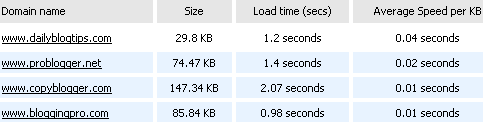
In order to check the load time of your site you can use an online tool called “Website Speed Test“. It allows you to enter up to 10 websites, and the results display the size of the website, the total loading time and the average speed per KB.
By the way I would suggest keeping your load time below 2 seconds. In the near future I will post an article with tips to make your pages load faster.